Project Portfolio Management Template: What to Track (with a Free Template)
A free project portfolio management template and a plain-English guide to what to track - status, RAG, milestones, budget and benefits - across your whole portfolio
PMO KNOWLEDGE HUB
Trish Malone
7/27/20263 min read
Project Portfolio Management Template: What to Track (with a Free Template)
If you are running more than a handful of projects, sooner or later someone - a director, a sponsor, a board - asks the same question: "How is the whole portfolio doing?" A good project portfolio management (PPM) template is how you answer that in seconds instead of spending a day pulling numbers together. This guide explains what a portfolio template should track and how to use it, and you can download a free project portfolio tracker to start today.
What is a project portfolio management template?
A project portfolio management template (often called a portfolio tracker) is a single view - usually a spreadsheet to begin with - that lists all your projects on one page, with the key information about each. Where a project plan tracks the detail inside one project, a portfolio template steps back and shows the health of every project at once, so leadership can see what is on track, what is at risk, and where the value is.
It answers three questions at a glance:
• What are we doing? Every active (and proposed) project in one list.
• How is each one doing? Status, progress, milestones, budget.
• Where do we need to act? The red and amber items that need attention.
Why a portfolio view matters
Tracking projects individually is necessary but not enough. Without a portfolio view you cannot easily answer "are we delivering?", spot that three projects all depend on the same stretched team, or show leadership the return on the money being spent. A portfolio template turns a pile of separate project updates into a single, decision-ready picture.
What to include in your portfolio template
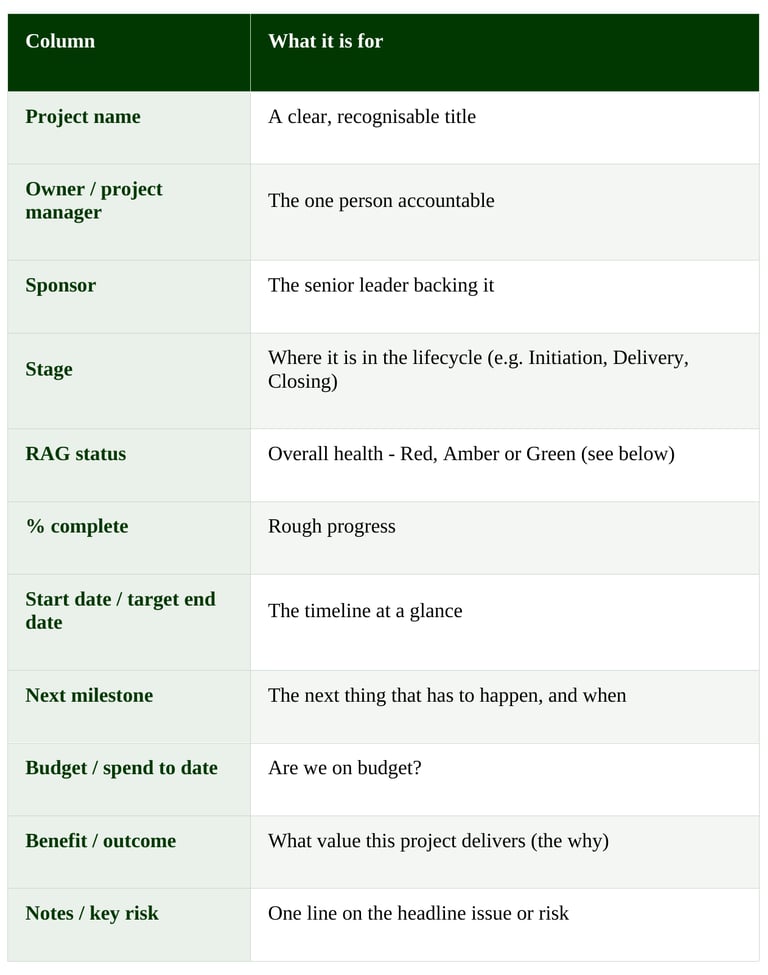
These are the columns a practical portfolio tracker needs. The free template below is set up with all of them.
Keep it to one row per project. The discipline of summarising each project in a single line is part of what makes the portfolio readable.
RAG status, explained
RAG stands for Red, Amber, Green - a simple traffic-light way to show each project's health:
• Green - on track for time, budget and scope.
• Amber - some concern; needs watching or minor intervention.
• Red - significant problem; needs action or a decision now.
RAG is powerful because a leader can scan a portfolio in seconds and know exactly where to focus. Agree what Red, Amber and Green mean for your organisation so everyone rates consistently.
How to use your portfolio template
• Update on a regular cadence - typically weekly or fortnightly, and before every portfolio or board review.
• Get each project owner to update their own row, so the data is owned and current.
• Review as a group: walk the reds and ambers first, agree actions, move on.
• Use it to make decisions - reprioritise, move resources, stop projects that are not delivering. A tracker that only describes is half a tool; the value is in what you do with it.
Portfolio template vs project plan
A project plan lives inside a single project - tasks, dates, dependencies, who is doing what. A portfolio template sits above all your projects and summarises each one. You need both: the plans run the projects; the portfolio template runs the portfolio.
When a spreadsheet is not enough
A spreadsheet portfolio tracker is the perfect place to start, and for a small portfolio it may be all you ever need. The strain shows as you grow: people forget to update it, versions multiply, it cannot roll risks or benefits up automatically, and the portfolio view is only ever as current as the last manual refresh. That is the point at which organisations move to a project portfolio management (PPM) tool - ideally one inside your own Microsoft environment, where every project owner updates in one place and leadership gets a live, board-ready dashboard without anyone rebuilding a spreadsheet. We can help when you get there.
Frequently asked questions
What is a project portfolio management template?
It is a single view - usually a spreadsheet - that lists all your projects with their key information (owner, status, RAG, milestones, budget and benefits) so you can see the health of the whole portfolio at a glance.
What should a portfolio tracker include?
At minimum: project name, owner, sponsor, stage, RAG status, % complete, start and target dates, next milestone, budget and spend, the benefit, and a one-line note on the key risk.
What does RAG status mean?
RAG stands for Red, Amber, Green - a traffic-light rating of each project's overall health, so leaders can quickly see where to focus.
What is the difference between a portfolio template and a project plan?
A project plan tracks the detail inside one project; a portfolio template summarises every project on one page to show the health of the whole portfolio.
Get a single view of every project today. Download the Project Portfolio Tracker - a ready-to-use spreadsheet with status, RAG, milestones, budget and benefits, plus a portfolio summary.
See it in practice
Outgrowing the spreadsheet? NextGen PPM gives you a live portfolio dashboard inside your own Microsoft tenant, updated by your teams in real time. Book a demo to see it.
Related: How to establish a PMO · How to build a portfolio report · Portfolio governance