RAID Management
What is RAID management? A plain-English guide to Risks, Assumptions, Issues and Dependencies - how to run a RAID log, with a free downloadable template.
PMO KNOWLEDGE HUB
Trish Malone
7/27/20264 min read
RAID Management: How to Run a RAID Log (with a Free Template)
If you manage projects or run a PMO, you have almost certainly been asked, "What are the risks?" - usually moments before a steering meeting. RAID management is the simple, repeatable way to have that answer ready every time. This guide explains what RAID means, how to run a RAID log, and the mistakes to avoid - and you can download a free RAID log template to start today.
What does RAID stand for?
RAID is a project-management acronym for four things every project needs to keep track of:
R - Risks. Things that might happen and would affect the project if they did (good or bad, though usually bad). Risks are about the future and are uncertain.
A - Assumptions. Things you are taking to be true in order to plan, but have not confirmed. If an assumption turns out to be wrong, it often becomes a risk or an issue.
I - Issues. Things that have already happened and are affecting the project right now. An issue is a problem in the present that needs managing.
D - Dependencies. Things your project relies on from someone or something else - another team, a supplier, a decision, or another project - and things that depend on you.
In short: risks might hurt you, issues are hurting you, assumptions are what you are hoping is true, and dependencies are the threads connecting you to everyone else.
What is a RAID log?
A RAID log is a single, living list where you record all four of these in one place. It is usually a table - a spreadsheet to start with - that the project manager keeps up to date and reviews regularly. It is the backbone of good project governance: when a sponsor, auditor or board asks what could derail delivery, the RAID log is your answer.
A good RAID log does three jobs:
1. Captures risks, assumptions, issues and dependencies as they arise.
2. Assigns an owner and an action to each one, so nothing is everyone's problem and no one's job.
3. Tracks status over time, so you can show what has been dealt with and what is still open.
What a RAID log looks like
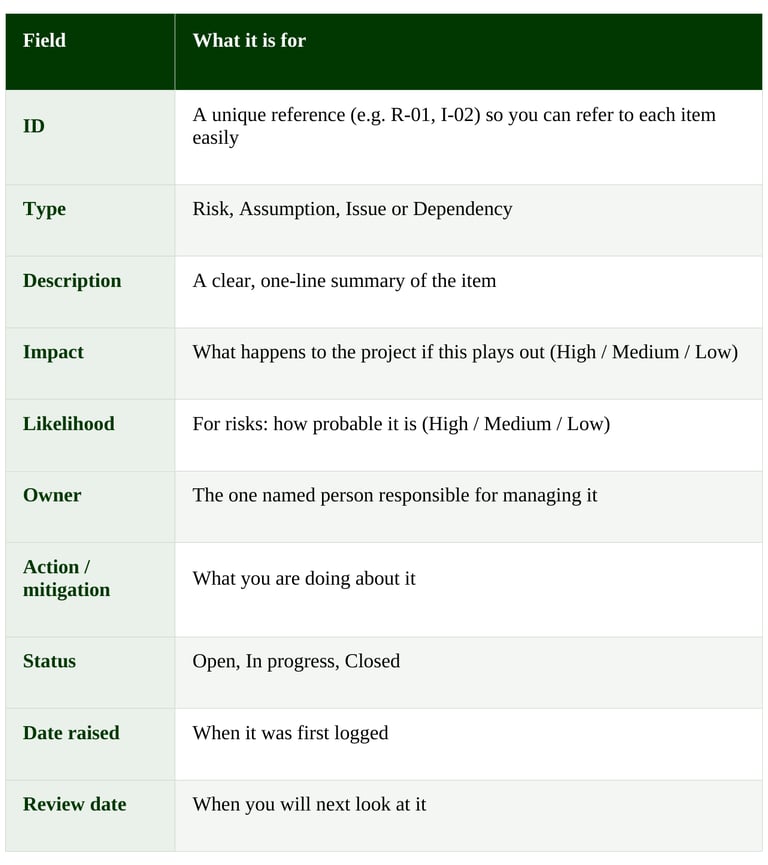
Here are the columns a practical RAID log needs. The free template below is set up exactly like this.
A couple of example entries:
R-01 · Risk - "Key supplier may miss the data-migration deadline." Impact: High. Likelihood: Medium. Owner: [Name]. Action: weekly check-ins; agree a fallback date. Status: Open.
D-01 · Dependency - "Go-live depends on the finance team confirming the new cost codes." Impact: High. Owner: [Name]. Action: confirmation requested, due [date]. Status: In progress.
How to manage each part of RAID
Risks. Score each risk by impact and likelihood, then focus your energy on the high-impact, high-likelihood ones. For each, decide how you will respond - reduce it, avoid it, transfer it, or accept it - and give it an owner and a date.
Assumptions. Write them down explicitly; unspoken assumptions are where projects quietly go wrong. Revisit them regularly and confirm or retire each one. When an assumption proves false, move it to risks or issues.
Issues. Because issues are already happening, they need an owner and an action immediately. Track them to closure and capture what you learned.
Dependencies. Note who owns each dependency on the other side, and the date you need it by. Dependencies between projects are a common cause of delay, so make them visible early.
RAID log vs risk register: what is the difference?
A risk register tracks only risks. A RAID log is broader - it tracks risks and assumptions, issues and dependencies in one place. For most projects, a single RAID log is simpler and gives a fuller picture than keeping several separate lists.
How often should you review it?
Update the RAID log as new items arise, and review it as a team on a regular cadence - typically weekly for an active project, and at every steering or board meeting. A RAID log that is only touched before reviews is not doing its job.
Common RAID mistakes to avoid
Vague descriptions. "Resourcing" is not an item; "We may lose our lead developer to another project in March" is.
No owner. Every item needs one named person, not a team.
Confusing risks and issues. If it has already happened, it is an issue, not a risk.
Set and forget. A RAID log only works if it is reviewed and kept current.
Living in one person's head (or laptop). It should be visible to the whole team and to governance.
From spreadsheet to portfolio
A spreadsheet RAID log is the perfect place to start, and for a single project it is often all you need. The challenge comes when you are running many projects: spreadsheets get out of date, do not roll up, and make it hard to see risk across the whole portfolio. That is the point at which teams move RAID into a proper project portfolio management (PPM) tool - ideally one that lives in your own Microsoft environment, so risks, issues and dependencies roll up automatically into board-ready dashboards. If you have reached that point, we can help.
Frequently asked questions
What does RAID stand for in project management?
RAID stands for Risks, Assumptions, Issues and Dependencies - the four things a project tracks in a RAID log to stay in control.
What is a RAID log used for?
A RAID log is a single place to record and manage a project's risks, assumptions, issues and dependencies, each with an owner, an action and a status, so nothing gets missed and governance has a clear view.
What is the difference between a risk and an issue?
A risk is something that might happen in the future; an issue is something that has already happened and is affecting the project now.
Is a RAID log the same as a risk register?
No - a risk register covers only risks, while a RAID log also covers assumptions, issues and dependencies in one combined view.
Start tracking your project's risks, assumptions, issues and dependencies today. Download the RAID log template - a ready-to-use spreadsheet set up exactly as described above.
See it in practice
Running RAID across lots of projects? NextGen PPM gives you portfolio-wide risk and issue visibility inside your own Microsoft tenant. Book a demo to see it.
Related: How to establish a PMO (pillar) · PMO governance framework · How to build a portfolio report